<?xml version="1.0" encoding="utf-8"?><feed xmlns="http://www.w3.org/2005/Atom" ><generator uri="https://jekyllrb.com/" version="3.10.0">Jekyll</generator><link href="https://drunarayan.github.io/tms/feed.xml" rel="self" type="application/atom+xml" /><link href="https://drunarayan.github.io/tms/" rel="alternate" type="text/html" /><updated>2026-11-14T02:24:34+00:00</updated><id>https://drunarayan.github.io/tms/feed.xml</id><title type="html">The Meenakshi School</title><subtitle>a learning repository for the meenakshi family of students, uncles, aunts, nieces, nephews &amp; friends</subtitle><author><name>Chandru Narayan</name></author><entry><title type="html">Functions &amp;amp; Slopes - Basics</title><link href="https://drunarayan.github.io/tms/functions_basic" rel="alternate" type="text/html" title="Functions &amp;amp; Slopes - Basics" /><published>2026-11-13T00:00:00+00:00</published><updated>2026-11-13T00:00:00+00:00</updated><id>https://drunarayan.github.io/tms/functions_basic</id><content type="html" xml:base="https://drunarayan.github.io/tms/functions_basic"><![CDATA[<!-- Functions & Slopes Basics -->

<h2 id="functions-and-slopes-using-geogebra">Functions and Slopes using Geogebra</h2>

<p>Dear all.  I did not get the feeling that we did very well last session. So,this time I am teaching a even more basic lesson in Functions and slopes.</p>

<div style="position: relative; width: 100%; max-width: 800px; margin: 0 auto;">
  <iframe src="https://www.geogebra.org/classic/ukpbyjzt?embed" width="100%" height="600" allowfullscreen="" style="border: 1px solid #e4e4e4; border-radius: 4px;" frameborder="0">
  </iframe>
</div>]]></content><author><name>Chandru Narayan</name></author><category term="lessons" /><category term="lessons" /><summary type="html"><![CDATA[]]></summary><media:thumbnail xmlns:media="http://search.yahoo.com/mrss/" url="https://drunarayan.github.io/tms/slopes.png" /><media:content medium="image" url="https://drunarayan.github.io/tms/slopes.png" xmlns:media="http://search.yahoo.com/mrss/" /></entry><entry><title type="html">Calculus Lesson 1: Speed &amp;amp; Distance Functions</title><link href="https://drunarayan.github.io/tms/calculus_lesson1" rel="alternate" type="text/html" title="Calculus Lesson 1: Speed &amp;amp; Distance Functions" /><published>2026-10-30T00:00:00+00:00</published><updated>2026-10-30T00:00:00+00:00</updated><id>https://drunarayan.github.io/tms/calculus_lesson1</id><content type="html" xml:base="https://drunarayan.github.io/tms/calculus_lesson1"><![CDATA[<!-- Calculus Lesson 1 Jupyter Notebook -->
<p>&lt;/div&gt;</p>
<div style="background-color: #f8f9fa; border: 1px solid #e2e8f0; border-radius: 8px; padding: 20px; margin: 20px 0; text-align: center; font-family: sans-serif;">
  <h3 style="margin-top: 0; color: #2d3748;">📸 Jupyter Notebook for Calculus Lesson 1a - Speed and Distance</h3>
  <p style="color: #4a5568; font-size: 0.95rem;">Click here to access Jupyter Notebook</p>
  <a href="https://boyceastrows.gleeze.com/hub/user-redirect/git-pull?repo=https://github.com/drunarayan/tmsnotebooks&amp;branch=main&amp;urlpath=lab/tree/tmsnotebooks/notebooks/calc1_speed_dist/calc1_speed_dist.ipynb?reset" target="_blank" rel="noopener noreferrer" style="display: inline-block; background-color: #1a73e8; color: white; padding: 10px 20px; font-weight: bold; text-decoration: none; border-radius: 4px; box-shadow: 0 2px 4px rgba(0,0,0,0.1);">
    Jupyter Notebook to learn about Speed &amp; Distance Functions!
  </a>
</div>
<div style="background-color: #f8f9fa; border: 1px solid #e2e8f0; border-radius: 8px; padding: 20px; margin: 20px 0; text-align: center; font-family: sans-serif;">
  <h3 style="margin-top: 0; color: #2d3748;">📸 Jupyter Notebook for Calculus Lesson 1b - Slopes Secants and Tangents</h3>
  <p style="color: #4a5568; font-size: 0.95rem;">Click here to access Jupyter Notebook</p>
  <a href="https://boyceastrows.gleeze.com/hub/user-redirect/git-pull?repo=https://github.com/drunarayan/tmsnotebooks&amp;branch=main&amp;urlpath=lab/tree/tmsnotebooks/notebooks/calc1_speed_dist/calc_secant_tangent_v5.ipynb?reset" target="_blank" rel="noopener noreferrer" style="display: inline-block; background-color: #1a73e8; color: white; padding: 10px 20px; font-weight: bold; text-decoration: none; border-radius: 4px; box-shadow: 0 2px 4px rgba(0,0,0,0.1);">
    Jupyter Notebook to learn about Slopes, Secants and Tangents of Curves!
  </a>


</div>]]></content><author><name>Chandru Narayan</name></author><category term="lessons" /><category term="lessons" /><summary type="html"><![CDATA[&lt;/div&gt; 📸 Jupyter Notebook for Calculus Lesson 1a - Speed and Distance Click here to access Jupyter Notebook Jupyter Notebook to learn about Speed &amp; Distance Functions! 📸 Jupyter Notebook for Calculus Lesson 1b - Slopes Secants and Tangents Click here to access Jupyter Notebook Jupyter Notebook to learn about Slopes, Secants and Tangents of Curves!]]></summary><media:thumbnail xmlns:media="http://search.yahoo.com/mrss/" url="https://drunarayan.github.io/tms/speed_dist.png" /><media:content medium="image" url="https://drunarayan.github.io/tms/speed_dist.png" xmlns:media="http://search.yahoo.com/mrss/" /></entry><entry><title type="html">JupyterLab VM Controller</title><link href="https://drunarayan.github.io/tms/wake-vm/" rel="alternate" type="text/html" title="JupyterLab VM Controller" /><published>2026-10-21T00:00:00+00:00</published><updated>2026-10-21T00:00:00+00:00</updated><id>https://drunarayan.github.io/tms/restart-jupyterlab</id><content type="html" xml:base="https://drunarayan.github.io/tms/wake-vm/"><![CDATA[<div style="max-width: 480px; margin: 2rem auto; padding: 25px; border: 1px solid #e1e4e8; border-radius: 8px; font-family: -apple-system, BlinkMacSystemFont, 'Segoe UI', Roboto, Helvetica, Arial, sans-serif;">
  <p style="margin-top: 0; color: #444; line-height: 1.5;">Enter the access code to start or stop the JupyterLab GCN Virtual Machine.</p>
  
  <div style="margin-bottom: 20px;">
    <label for="vm-pass" style="display: block; margin-bottom: 8px; font-weight: 600; color: #24292e;">Access Code:</label>
    <input type="password" id="vm-pass" style="width: 100%; padding: 10px; border: 1px solid #ccc; border-radius: 4px; box-sizing: border-box; font-size: 16px;" placeholder="Enter access password" />
  </div>

  <div style="display: flex; gap: 10px;">
    <button id="wake-btn" onclick="controlVm('wake')" style="flex: 1; background-color: #28a745; color: white; border: none; padding: 12px; border-radius: 4px; cursor: pointer; font-weight: 600; font-size: 15px;">
      Wake Up Server
    </button>
    <button id="shutdown-btn" onclick="controlVm('shutdown')" style="flex: 1; background-color: #dc3545; color: white; border: none; padding: 12px; border-radius: 4px; cursor: pointer; font-weight: 600; font-size: 15px;">
      Shutdown Server
    </button>
  </div>

  <div id="response-msg" style="margin-top: 18px; font-weight: 600; text-align: center; line-height: 1.4;"></div>
</div>

<script>
async function controlVm(actionType) {
  const wakeBtn = document.getElementById('wake-btn');
  const shutdownBtn = document.getElementById('shutdown-btn');
  const msg = document.getElementById('response-msg');
  const password = document.getElementById('vm-pass').value;

  const FUNCTION_URL = "https://wake-gcn-vm-574717140851.us-west1.run.app/";

  if (!password) {
    msg.style.color = '#d73a49';
    msg.innerText = "Please enter the password.";
    return;
  }

  wakeBtn.disabled = true;
  shutdownBtn.disabled = true;
  msg.style.color = '#0366d6';
  msg.innerText = actionType === 'shutdown' ? "Sending shutdown command..." : "Sending wake command...";

  try {
    const response = await fetch(FUNCTION_URL, {
      method: 'POST',
      headers: { 'Content-Type': 'application/json' },
      body: JSON.stringify({ password: password, action: actionType })
    });

    const resData = await response.json();

    if (response.ok) {
      msg.style.color = '#28a745';
      msg.innerText = resData.message;
    } else {
      msg.style.color = '#d73a49';
      msg.innerText = resData.message || "Request failed.";
    }
  } catch (err) {
    msg.style.color = '#d73a49';
    msg.innerText = "Connection error. Please try again.";
  } finally {
    wakeBtn.disabled = false;
    shutdownBtn.disabled = false;
  }
}
</script>]]></content><author><name>Chandru Narayan</name></author><category term="resources" /><category term="resources" /><summary type="html"><![CDATA[Enter the access code to start or stop the JupyterLab GCN Virtual Machine. Access Code:]]></summary><media:thumbnail xmlns:media="http://search.yahoo.com/mrss/" url="https://drunarayan.github.io/tms/typewriter-type-fast.gif" /><media:content medium="image" url="https://drunarayan.github.io/tms/typewriter-type-fast.gif" xmlns:media="http://search.yahoo.com/mrss/" /></entry><entry><title type="html">Magic of Exponentials Wrap-up</title><link href="https://drunarayan.github.io/tms/magic-of-exponentials-wrap-up" rel="alternate" type="text/html" title="Magic of Exponentials Wrap-up" /><published>2026-08-20T00:00:00+00:00</published><updated>2026-08-20T00:00:00+00:00</updated><id>https://drunarayan.github.io/tms/magic-of-exponentials-wrap-up</id><content type="html" xml:base="https://drunarayan.github.io/tms/magic-of-exponentials-wrap-up"><![CDATA[<p><img src="/tms/assets/img/tc_transition.png" alt="" /></p>

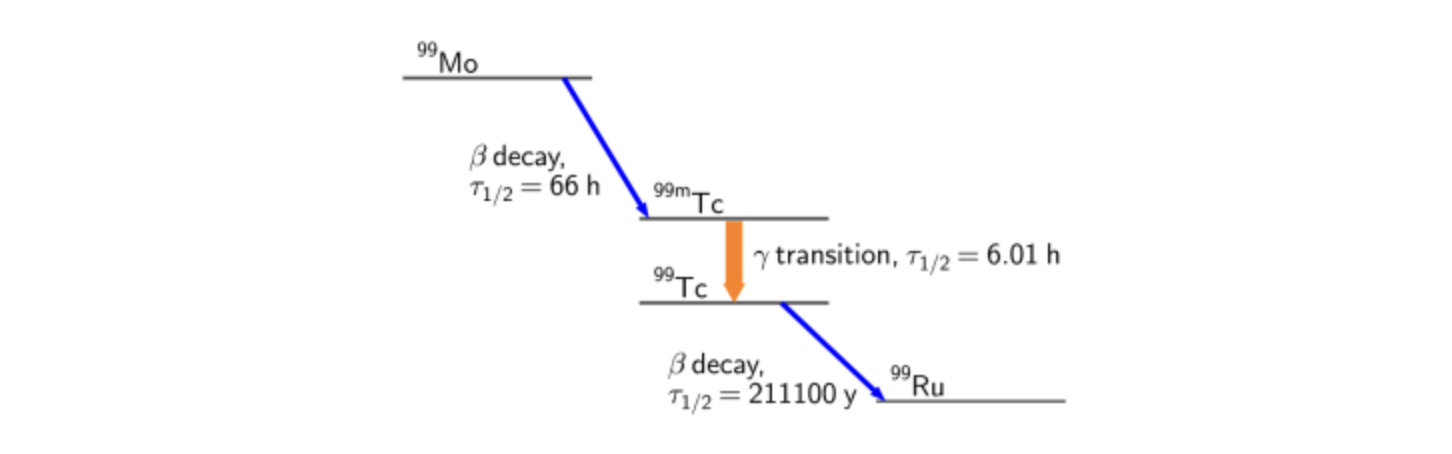
<h4 id="albert-einstein-most-certainly-did-not-say-compound-interest-is-the-most-powerful-force-in-the-universe-still-it-may-certainly-be-true-">Albert Einstein most certainly did NOT say “Compound Interest is the most powerful force in the Universe”. Still, it may certainly be true …</h4>

<h3 id="-interactive-lesson-worksheet">📖 Interactive Lesson Worksheet</h3>
<p>Below is the full worksheet for our upcoming lesson. You can view it directly on this page, or download it using the link below the viewer.</p>

<iframe src="/tms/magic_of_exponentials.pdf#view=FitH&amp;navpanes=0" width="100%" height="900px" style="border: 2px solid #ddd; border-radius: 4px;">
  This browser does not support embedding PDFs. Please download the  Magic of Exponentials Lesson PDF to view it.
</iframe>

<p style="text-align: center; margin-top: 15px;">
  📥 <a href="/tms/magic_of_exponentials.pdf" download="" style="font-weight: bold; text-decoration: underline;">Click here to download the Magic of Exponentials Lesson PDF Worksheet</a>
</p>

<iframe src="/tms/magic-of-exponentials-lesson-plan-summary.pdf#view=FitH&amp;navpanes=0" width="100%" height="900px" style="border: 2px solid #ddd; border-radius: 4px;">
  This browser does not support embedding PDFs. Please download the  Magic of Exponentials Summary PDF to view it.
</iframe>

<p style="text-align: center; margin-top: 15px;">
  📥 <a href="/tms/magic-of-exponentials-lesson-plan-summary.pdf" download="" style="font-weight: bold; text-decoration: underline;">Click here to download the  Magic of Exponentials Summary PDF Worksheet</a>
</p>

<p><code class="language-plaintext highlighter-rouge">Let's do some of these Mathematical Series type problems in Python and plot the results!</code></p>

<!-- Series and Exponentials Jupyter Notebook -->
<div style="background-color: #f8f9fa; border: 1px solid #e2e8f0; border-radius: 8px; padding: 20px; margin: 20px 0; text-align: center; font-family: sans-serif;">
  <h3 style="margin-top: 0; color: #2d3748;">📸 Complete this Jupyter Notebook to discover the astonishing power of Mathematical Series and Exponentials</h3>
  <p style="color: #4a5568; font-size: 0.95rem;">Click here to access Jupyter Notebook</p>
  <a href="https://boyceastrows.gleeze.com/hub/user-redirect/git-pull?repo=https://github.com/drunarayan/tmsnotebooks&amp;branch=main&amp;urlpath=lab/tree/tmsnotebooks/notebooks/series_progressions/series_and_progressions.ipynb?reset" target="_blank" rel="noopener noreferrer" style="display: inline-block; background-color: #1a73e8; color: white; padding: 10px 20px; font-weight: bold; text-decoration: none; border-radius: 4px; box-shadow: 0 2px 4px rgba(0,0,0,0.1);">
    Jupyter Notebook to discover the astonishing power of Mathematical Series and Exponentials!
  </a>
</div>]]></content><author><name>Chandru Narayan</name></author><category term="lessons" /><category term="lessons" /><summary type="html"><![CDATA[]]></summary><media:thumbnail xmlns:media="http://search.yahoo.com/mrss/" url="https://drunarayan.github.io/tms/thyroid_scan.png" /><media:content medium="image" url="https://drunarayan.github.io/tms/thyroid_scan.png" xmlns:media="http://search.yahoo.com/mrss/" /></entry><entry><title type="html">Happy Independence Day</title><link href="https://drunarayan.github.io/tms/happy-independence-day" rel="alternate" type="text/html" title="Happy Independence Day" /><published>2026-08-15T00:00:00+00:00</published><updated>2026-08-15T00:00:00+00:00</updated><id>https://drunarayan.github.io/tms/happy-independence-day</id><content type="html" xml:base="https://drunarayan.github.io/tms/happy-independence-day"><![CDATA[<p><img src="/tms/assets/img/indep_day.png" alt="" /></p>]]></content><author><name>Chandru Narayan</name></author><category term="lessons" /><category term="lessons" /><summary type="html"><![CDATA[]]></summary><media:thumbnail xmlns:media="http://search.yahoo.com/mrss/" url="https://drunarayan.github.io/tms/indep_day.png" /><media:content medium="image" url="https://drunarayan.github.io/tms/indep_day.png" xmlns:media="http://search.yahoo.com/mrss/" /></entry><entry><title type="html">Magic of Exponentials</title><link href="https://drunarayan.github.io/tms/magic-of-exponentials" rel="alternate" type="text/html" title="Magic of Exponentials" /><published>2026-08-11T00:00:00+00:00</published><updated>2026-08-11T00:00:00+00:00</updated><id>https://drunarayan.github.io/tms/magic-of-exponentials</id><content type="html" xml:base="https://drunarayan.github.io/tms/magic-of-exponentials"><![CDATA[<p><img src="/tms/assets/img/ci2.png" alt="" /></p>

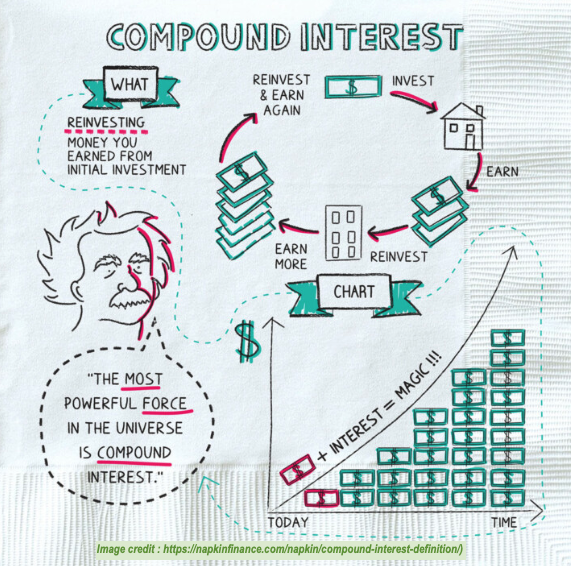
<h4 id="albert-einstein-most-certainly-did-not-say-compound-interest-is-the-most-powerful-force-in-the-universe-still-it-may-certainly-be-true-">Albert Einstein most certainly did NOT say “Compound Interest is the most powerful force in the Universe”. Still, it may certainly be true …</h4>

<h3 id="-interactive-lesson-worksheet">📖 Interactive Lesson Worksheet</h3>
<p>Below is the full worksheet for our upcoming lesson. You can view it directly on this page, or download it using the link below the viewer.</p>

<iframe src="/tms/magic_of_exponentials.pdf#view=FitH&amp;navpanes=0" width="100%" height="900px" style="border: 2px solid #ddd; border-radius: 4px;">
  This browser does not support embedding PDFs. Please download the  Magic of Exponentials Lesson PDF to view it.
</iframe>

<p style="text-align: center; margin-top: 15px;">
  📥 <a href="/tms/magic_of_exponentials.pdf" download="" style="font-weight: bold; text-decoration: underline;">Click here to download the Magic of Exponentials Lesson PDF Worksheet</a>
</p>

<iframe src="/tms/magic-of-exponentials-lesson-plan-summary.pdf#view=FitH&amp;navpanes=0" width="100%" height="900px" style="border: 2px solid #ddd; border-radius: 4px;">
  This browser does not support embedding PDFs. Please download the  Magic of Exponentials Summary PDF to view it.
</iframe>

<p style="text-align: center; margin-top: 15px;">
  📥 <a href="/tms/magic-of-exponentials-lesson-plan-summary.pdf" download="" style="font-weight: bold; text-decoration: underline;">Click here to download the  Magic of Exponentials Summary PDF Worksheet</a>
</p>]]></content><author><name>Chandru Narayan</name></author><category term="lessons" /><category term="lessons" /><summary type="html"><![CDATA[]]></summary><media:thumbnail xmlns:media="http://search.yahoo.com/mrss/" url="https://drunarayan.github.io/tms/ci.png" /><media:content medium="image" url="https://drunarayan.github.io/tms/ci.png" xmlns:media="http://search.yahoo.com/mrss/" /></entry><entry><title type="html">Geogebra Intro &amp;amp; Accounts</title><link href="https://drunarayan.github.io/tms/geogebra-account" rel="alternate" type="text/html" title="Geogebra Intro &amp;amp; Accounts" /><published>2026-07-31T00:00:00+00:00</published><updated>2026-07-31T00:00:00+00:00</updated><id>https://drunarayan.github.io/tms/geogebra-account</id><content type="html" xml:base="https://drunarayan.github.io/tms/geogebra-account"><![CDATA[<h3 id="using-geogebra-to-learn-mathematics-visually">Using Geogebra to Learn Mathematics Visually</h3>

<p><code class="language-plaintext highlighter-rouge">We will be using Geogebra in TMS - a very popular Mathematics learning tool used by students &amp; teachers alike around the world.</code></p>

<p><code class="language-plaintext highlighter-rouge">First, parents have a responsibility to create accounts on their student's behalf!</code></p>

<!-- Create Geogebra Accounts Section -->
<p><img src="../assets/img/geogebra-accts.png" alt="uc" /></p>

<div style="background-color: #f8f9fa; border: 1px solid #e2e8f0; border-radius: 8px; padding: 20px; margin: 20px 0; text-align: center; font-family: sans-serif;">
  <h3 style="margin-top: 0; color: #2d3748;">📸 Create Geogebra Accounts</h3>
  <p style="color: #4a5568; font-size: 0.95rem;">Click button below to create accounts for yourself and your students! See hints above.</p>
  <a href="https://accounts.geogebra.org/user/create/expiration/129600/clientinfo/website" target="_blank" rel="noopener noreferrer" style="display: inline-block; background-color: #1a73e8; color: white; padding: 10px 20px; font-weight: bold; text-decoration: none; border-radius: 4px; box-shadow: 0 2px 4px rgba(0,0,0,0.1);">
    Click here to create Geogebra Accounts
  </a>
</div>

<p><code class="language-plaintext highlighter-rouge">Once you have created the accounts, we will do a short lesson for students to learn the formula for the area of a circle and why that works!.  If you have not completed this step ahead of the class, you can do this exercise without logging in.  Please do this for future before we teach other sessions using Geogebra</code></p>

<div style="background-color: #f8f9fa; border: 1px solid #e2e8f0; border-radius: 8px; padding: 20px; margin: 20px 0; text-align: center; font-family: sans-serif;">
  <h3 style="margin-top: 0; color: #2d3748;">📸 Visualize Area of a Circle Formula</h3>
  <p style="color: #4a5568; font-size: 0.95rem;">Click button below for Area of of Circle Lesson.</p>
  <a href="https://www.geogebra.org/m/kavag7ve" target="_blank" rel="noopener noreferrer" style="display: inline-block; background-color: #1a73e8; color: white; padding: 10px 20px; font-weight: bold; text-decoration: none; border-radius: 4px; box-shadow: 0 2px 4px rgba(0,0,0,0.1);">
    Visualize Area of Circle Formula
  </a>
</div>]]></content><author><name>Chandru Narayan</name></author><category term="lessons" /><category term="lessons" /><summary type="html"><![CDATA[Using Geogebra to Learn Mathematics Visually]]></summary><media:thumbnail xmlns:media="http://search.yahoo.com/mrss/" url="https://drunarayan.github.io/tms/geogebra-intro.png" /><media:content medium="image" url="https://drunarayan.github.io/tms/geogebra-intro.png" xmlns:media="http://search.yahoo.com/mrss/" /></entry><entry><title type="html">Astro Calculations</title><link href="https://drunarayan.github.io/tms/astro-calculations" rel="alternate" type="text/html" title="Astro Calculations" /><published>2026-07-30T00:00:00+00:00</published><updated>2026-07-30T00:00:00+00:00</updated><id>https://drunarayan.github.io/tms/astro-calculations</id><content type="html" xml:base="https://drunarayan.github.io/tms/astro-calculations"><![CDATA[<h3 id="do-some-astronomical-calculations-based-on-our-vk-lab">Do some Astronomical calculations based on our VK Lab</h3>

<p><code class="language-plaintext highlighter-rouge">We will use an image of the 2024 Solar Eclipse that I took in Waco, Texas on April 8th of that year.  I also captured a video that you can see below using the SeeStar telescope we all used during the Vigyan Karyashala Lab.</code></p>

<div style="position: relative; padding-bottom: 56.25%; height: 0; overflow: hidden; max-width: 100%; border-radius: 8px; margin: 20px 0;">
  <iframe src="https://www.youtube-nocookie.com/embed/WKC8G-rem-M" style="position: absolute; top: 0; left: 0; width: 100%; height: 100%;" frameborder="0" allow="accelerometer; autoplay; clipboard-write; encrypted-media; gyroscope; picture-in-picture" allowfullscreen="">
  </iframe>
</div>

<p><code class="language-plaintext highlighter-rouge">We will be calculating the diameter of the Moon which eclipsed the Sun in the video above and many other Astronomical objects imaged a few days ago in Seattle. Access this Google Photo Album Below to download your image!</code></p>

<!-- Google Photos Album Card Section -->
<div style="background-color: #f8f9fa; border: 1px solid #e2e8f0; border-radius: 8px; padding: 20px; margin: 20px 0; text-align: center; font-family: sans-serif;">
  <h3 style="margin-top: 0; color: #2d3748;">📸 Photo Album: Live Astro Imaging Night</h3>
  <p style="color: #4a5568; font-size: 0.95rem;">Check out the full gallery of captured deep-sky images, equipment setups, and behind-the-scenes streams shared with India!</p>
  <a href="https://photos.app.goo.gl/eL71wEoY7CXse871A" target="_blank" rel="noopener noreferrer" style="display: inline-block; background-color: #1a73e8; color: white; padding: 10px 20px; font-weight: bold; text-decoration: none; border-radius: 4px; box-shadow: 0 2px 4px rgba(0,0,0,0.1);">
    View Google Photos Album
  </a>
</div>

<p><code class="language-plaintext highlighter-rouge">Once you have downloaded your assigned astro image, we will use the following Jupyter notebook.  It will give you a procedure to first do an estimate with just pen and paper.  This is very crucial for all scientist to do approximate calculations on your bound notebook with the use of a calculator as need be.</code></p>

<p><code class="language-plaintext highlighter-rouge">We will then use the Astro measuring tool below which will measure the number of pixels from an Astro image and converting that to an angle.  Once we know that angle in degrees and convert to radians, we can calculate the actual extent of the object in km or in light years for extremely big targets like nebulae and galaxies.  You will need to write down the name and pixel sizes in your bound notebook before proceeding.</code></p>

<!-- Video Help for Astrolab Measuring Tool -->
<div style="position: relative; padding-bottom: 56.25%; height: 0; overflow: hidden; max-width: 100%; border-radius: 8px; margin: 20px 0;">
  <iframe src="https://www.youtube-nocookie.com/embed/R9kRd_1xuRQ" style="position: absolute; top: 0; left: 0; width: 100%; height: 100%;" frameborder="0" allow="accelerometer; autoplay; clipboard-write; encrypted-media; gyroscope; picture-in-picture" allowfullscreen="">
  </iframe>
</div>

<!-- Astrolab Measuring Tool -->
<div style="background-color: #f8f9fa; border: 1px solid #e2e8f0; border-radius: 8px; padding: 20px; margin: 20px 0; text-align: center; font-family: sans-serif;">
  <h3 style="margin-top: 0; color: #2d3748;">📸 Measure Astronomical Objects in Pixels</h3>
  <p style="color: #4a5568; font-size: 0.95rem;">Use this Astrolab Tool to view astronomical images taken through the telescope and measuring their extents.</p>
  <a href="https://www.schoolsobservatory.org/astrolab/?lvl=1" target="_blank" rel="noopener noreferrer" style="display: inline-block; background-color: #1a73e8; color: white; padding: 10px 20px; font-weight: bold; text-decoration: none; border-radius: 4px; box-shadow: 0 2px 4px rgba(0,0,0,0.1);">
    Astrolab Measure Tool
  </a>
</div>

<p><code class="language-plaintext highlighter-rouge">By now you would have the pixel sizes handy which you will need in the Jupyter Notebook below!</code></p>

<!-- Astro Measurements in Jupyter Notebook -->
<div style="background-color: #f8f9fa; border: 1px solid #e2e8f0; border-radius: 8px; padding: 20px; margin: 20px 0; text-align: center; font-family: sans-serif;">
  <h3 style="margin-top: 0; color: #2d3748;">📸 Complete this Jupyter Notebook to discover the Actual Sizes of Astronomical Objects assigned to you</h3>
  <p style="color: #4a5568; font-size: 0.95rem;">Click here to access Jupyter Notebook</p>
  <a href="https://boyceastrows.gleeze.com/hub/user-redirect/git-pull?repo=https://github.com/drunarayan/tmsnotebooks&amp;branch=main&amp;urlpath=lab/tree/tmsnotebooks/notebooks/measure_astro_targets/measure_astro_targets.ipynb?reset" target="_blank" rel="noopener noreferrer" style="display: inline-block; background-color: #1a73e8; color: white; padding: 10px 20px; font-weight: bold; text-decoration: none; border-radius: 4px; box-shadow: 0 2px 4px rgba(0,0,0,0.1);">
    Jupyter Notebook to Measure Sizes of Astronomical Objects!
  </a>
</div>]]></content><author><name>Chandru Narayan</name></author><category term="lessons" /><category term="lessons" /><summary type="html"><![CDATA[Do some Astronomical calculations based on our VK Lab]]></summary><media:thumbnail xmlns:media="http://search.yahoo.com/mrss/" url="https://drunarayan.github.io/tms/smf.png" /><media:content medium="image" url="https://drunarayan.github.io/tms/smf.png" xmlns:media="http://search.yahoo.com/mrss/" /></entry><entry><title type="html">Build your own Github and CV</title><link href="https://drunarayan.github.io/tms/build-your-own-github-website-and-cv" rel="alternate" type="text/html" title="Build your own Github and CV" /><published>2026-07-29T00:00:00+00:00</published><updated>2026-07-29T00:00:00+00:00</updated><id>https://drunarayan.github.io/tms/build-your-own-github-website-and-cv</id><content type="html" xml:base="https://drunarayan.github.io/tms/build-your-own-github-website-and-cv"><![CDATA[<p>In this lesson (which will last multiple weeks), we will create a Github site like real research students as a web repository of all of our academic and personal accomplishments. Specifically, we will include our research projects, publications, scientific, professional, and personal interests.  Everything we store will be published as a website for the general public to see from anywhere in the world and get to know you as a professional. You will then officially join the community of millions researchers worldwide.</p>

<p>We will create the default website first and methodically update it with your own information vis The Meenakshi School lessons. Who knows, your patti Meenakshi herself might see it as she watches over all of us attending her school!</p>

<p><img src="/tms/assets/img/assets/amma-bear-slippers.jpg" alt="Seattle" /></p>]]></content><author><name>Chandru Narayan</name></author><category term="lessons" /><category term="lessons" /><summary type="html"><![CDATA[In this lesson (which will last multiple weeks), we will create a Github site like real research students as a web repository of all of our academic and personal accomplishments. Specifically, we will include our research projects, publications, scientific, professional, and personal interests. Everything we store will be published as a website for the general public to see from anywhere in the world and get to know you as a professional. You will then officially join the community of millions researchers worldwide.]]></summary><media:thumbnail xmlns:media="http://search.yahoo.com/mrss/" url="https://drunarayan.github.io/tms/github_cv.png" /><media:content medium="image" url="https://drunarayan.github.io/tms/github_cv.png" xmlns:media="http://search.yahoo.com/mrss/" /></entry><entry><title type="html">Numbers and Infinities UPDATED!</title><link href="https://drunarayan.github.io/tms/infinity-and-infinitesimals" rel="alternate" type="text/html" title="Numbers and Infinities UPDATED!" /><published>2026-07-24T00:00:00+00:00</published><updated>2026-07-24T00:00:00+00:00</updated><id>https://drunarayan.github.io/tms/infinity-and-infinitesimals</id><content type="html" xml:base="https://drunarayan.github.io/tms/infinity-and-infinitesimals"><![CDATA[<h2 id="numbers-and-infinities-jupyter-notebooks"><a href="https://drunarayan.github.io/tmsnotebooks/notebooks/num_infi/">Numbers and Infinities Jupyter Notebooks</a></h2>

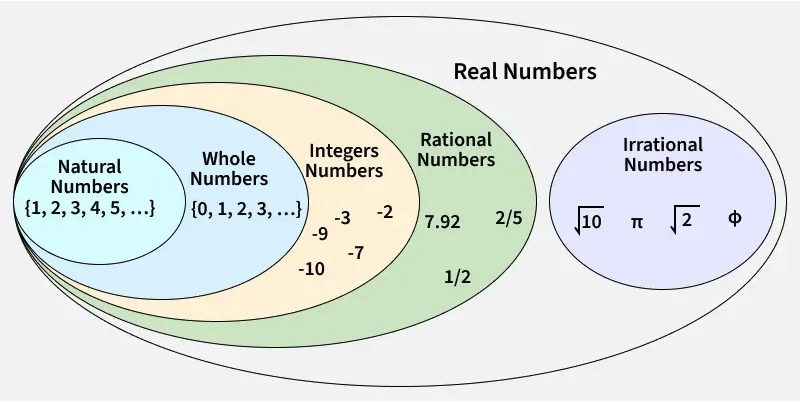
<h2 id="types-of-numbers"><a href="https://www.geeksforgeeks.org/maths/types-of-numbers/">Types of Numbers</a></h2>

<p><img src="/tms/assets/img/surds.png" alt="Seattle" /></p>

<ol>
  <li>Natural Numbers</li>
  <li>Integers</li>
  <li>Rational Numbers</li>
  <li>Irrational Numbers</li>
</ol>

<h2 id="types-of-infinities">Types of Infinities</h2>

<ol>
  <li>Countable Infinity</li>
  <li>Uncountable Infinity</li>
  <li>Algebraic Infinity</li>
</ol>

<h2 id="infinite-series">Infinite Series</h2>
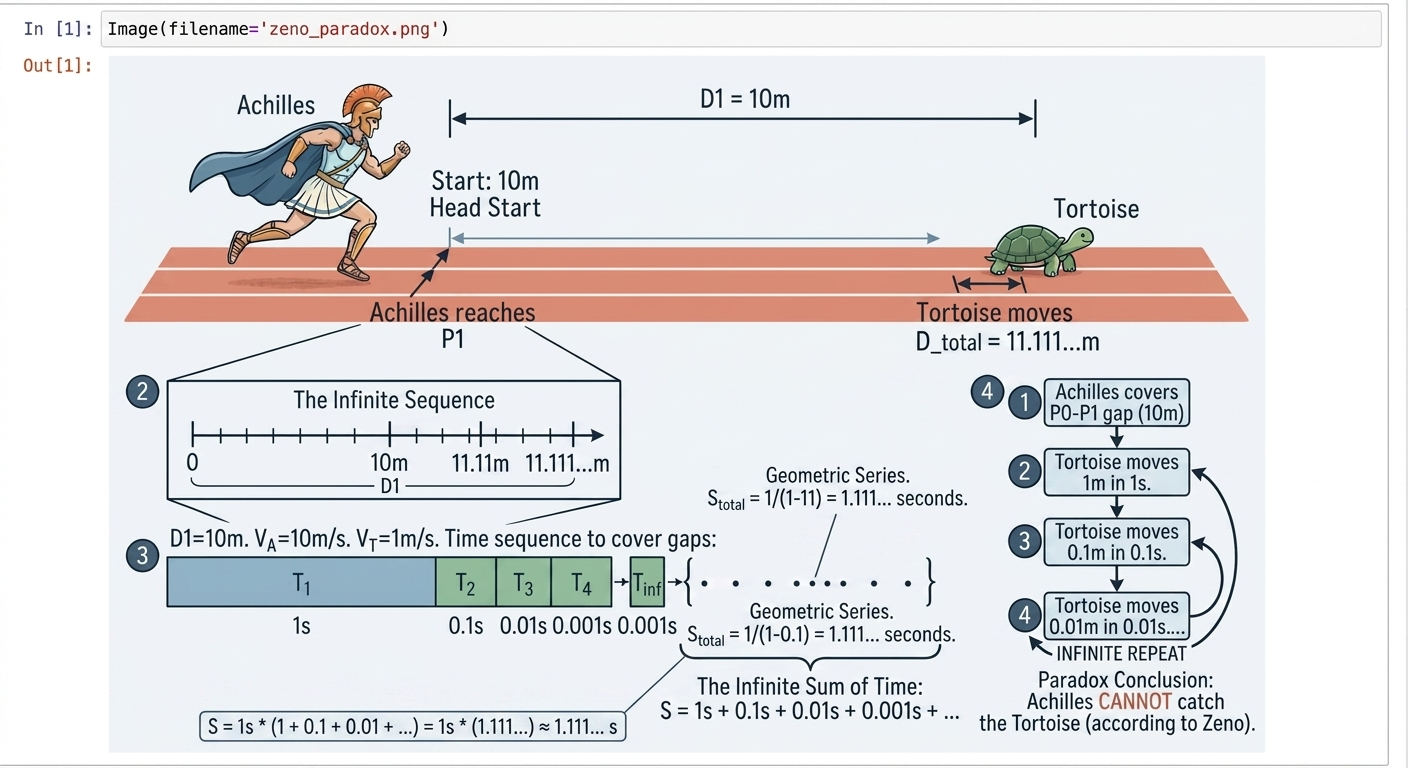
<p><img src="/tms/assets/img/zenos_paradox.png" alt="Seattle" /></p>
<ol>
  <li>Zeno’s Paradox</li>
  <li>Infinite Series</li>
</ol>]]></content><author><name>Chandru Narayan</name></author><category term="lessons" /><category term="lessons" /><summary type="html"><![CDATA[Numbers and Infinities Jupyter Notebooks]]></summary><media:thumbnail xmlns:media="http://search.yahoo.com/mrss/" url="https://drunarayan.github.io/tms/infi.png" /><media:content medium="image" url="https://drunarayan.github.io/tms/infi.png" xmlns:media="http://search.yahoo.com/mrss/" /></entry></feed>