Astro Calculations
Written on July 30th, 2026 by Chandru Narayan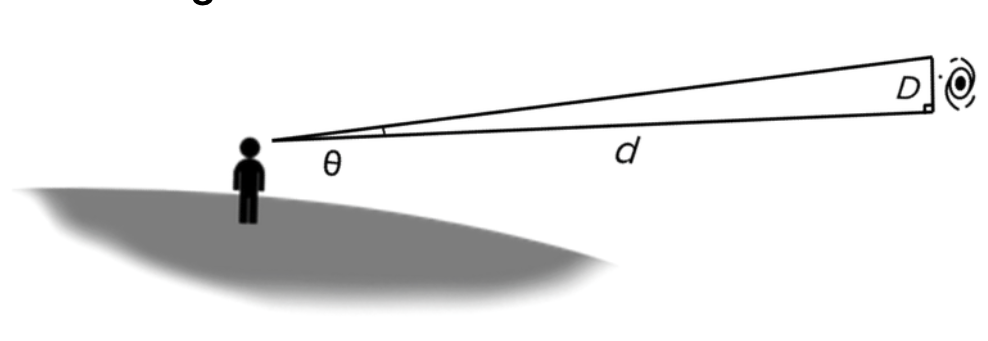
Do some Astronomical calculations based on our VK Lab
We will use an image of the 2024 Solar Eclipse that I took in Waco, Texas on April 8th of that year. I also captured a video that you can see below using the SeeStar telescope we all used during the Vigyan Karyashala Lab.
We will be calculating the diameter of the Moon which eclipsed the Sun in the video above and many other Astronomical objects imaged a few days ago in Seattle. Access this Google Photo Album Below to download your image!
📸 Photo Album: Live Astro Imaging Night
Check out the full gallery of captured deep-sky images, equipment setups, and behind-the-scenes streams shared with India!
View Google Photos AlbumOnce you have downloaded your assigned astro image, we will use the following Jupyter notebook. It will give you a procedure to first do an estimate with just pen and paper. This is very crucial for all scientist to do approximate calculations on your bound notebook with the use of a calculator as need be.
We will then use the Astro measuring tool below which will measure the number of pixels from an Astro image and converting that to an angle. Once we know that angle in degrees and convert to radians, we can calculate the actual extent of the object in km or in light years for extremely big targets like nebulae and galaxies. You will need to write down the name and pixel sizes in your bound notebook before proceeding.
📸 Measure Astronomical Objects in Pixels
Use this Astrolab Tool to view astronomical images taken through the telescope and measuring their extents.
Astrolab Measure ToolBy now you would have the pixel sizes handy which you will need in the Jupyter Notebook below!
📸 Complete this Jupyter Notebook to discover the Actual Sizes of Astronomical Objects assigned to you
Click here to access Jupyter Notebook
Jupyter Notebook to Measure Sizes of Astronomical Objects!